

Cloud Video for Existing Cameras | Stream Connector
Moving to cloud video surveillance does not have to mean replacing every camera. Many organizations have existing surveillance systems with a mix of camera manufacturers, older hardware, and infrastructure that still has years of useful life. YourSix Stream Connector provides a practical way to bring these existing cameras into a cloud video surveillance platform without requiring a complete rip-and-replace.
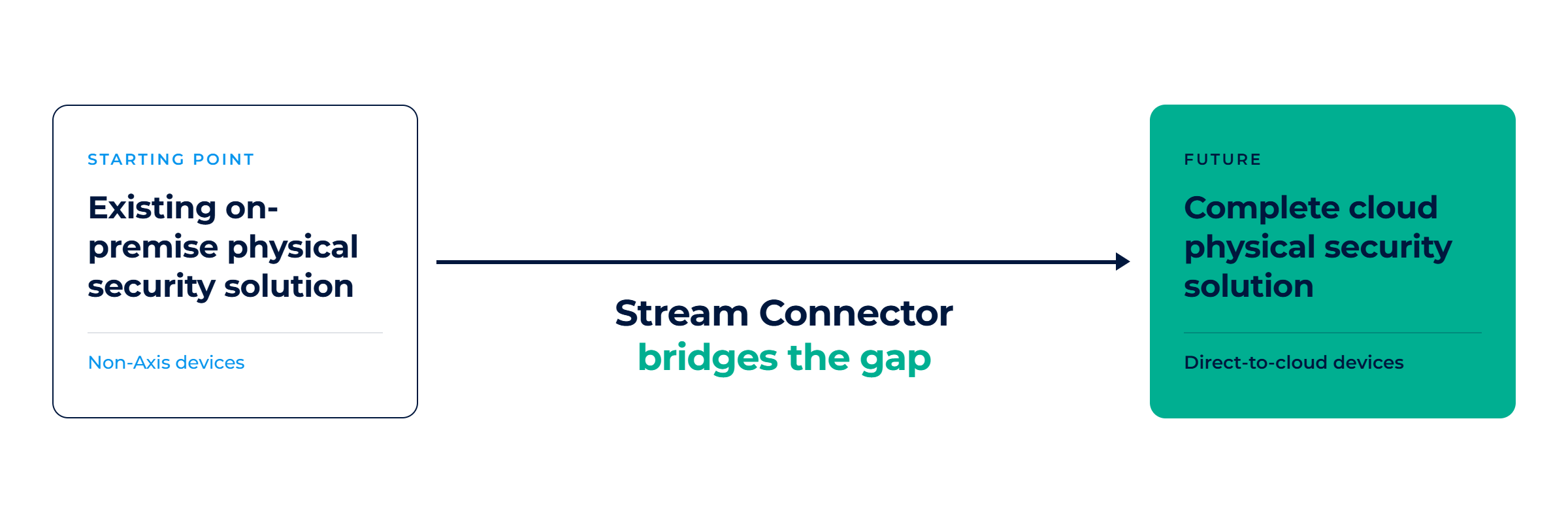
YourSix Stream Connector brings compatible third-party RTSP and ONVIF cameras into Y6OS using an AXIS S30 Series appliance. This allows organizations to securely access live and recorded video through the cloud, centralize video management across locations, and maintain their existing camera investment while gaining the flexibility of cloud video surveillance.
By connecting existing camera infrastructure with Y6OS, Stream Connector creates a migration path from traditional video surveillance systems to a direct-to-cloud architecture. Organizations can continue using compatible existing cameras today while gradually adopting direct-to-cloud devices over time, all within a unified cloud-managed video surveillance platform.
-
- Protect your existing camera investment — modernize without requiring a full rip-and-replace.
- Create a bridge to direct-to-cloud — migrate to cloud-native cameras over time while managing everything in one platform.
- Reduce upfront modernization costs — keep existing cameras in service while eliminating dependence on traditional VMS architecture.
- Simplify multi-site deployments — standardize how video is accessed and managed across locations with different generations of camera infrastructure.
- Centralize user management — manage user access from one platform instead of maintaining credentials across individual sites and systems.
- Enable remote access from anywhere — securely access live and recorded video without connecting to the local network.
- Simplify IT requirements — reduce the need for VPNs, inbound firewall rules, port forwarding, and specialized client software.
- Create a consistent user experience — operators use the same interface whether video comes from a Stream Connector or a direct-to-cloud camera.
- Reduce training requirements — teams learn one platform instead of multiple VMS and camera management systems.
Cloud Video Surveillance
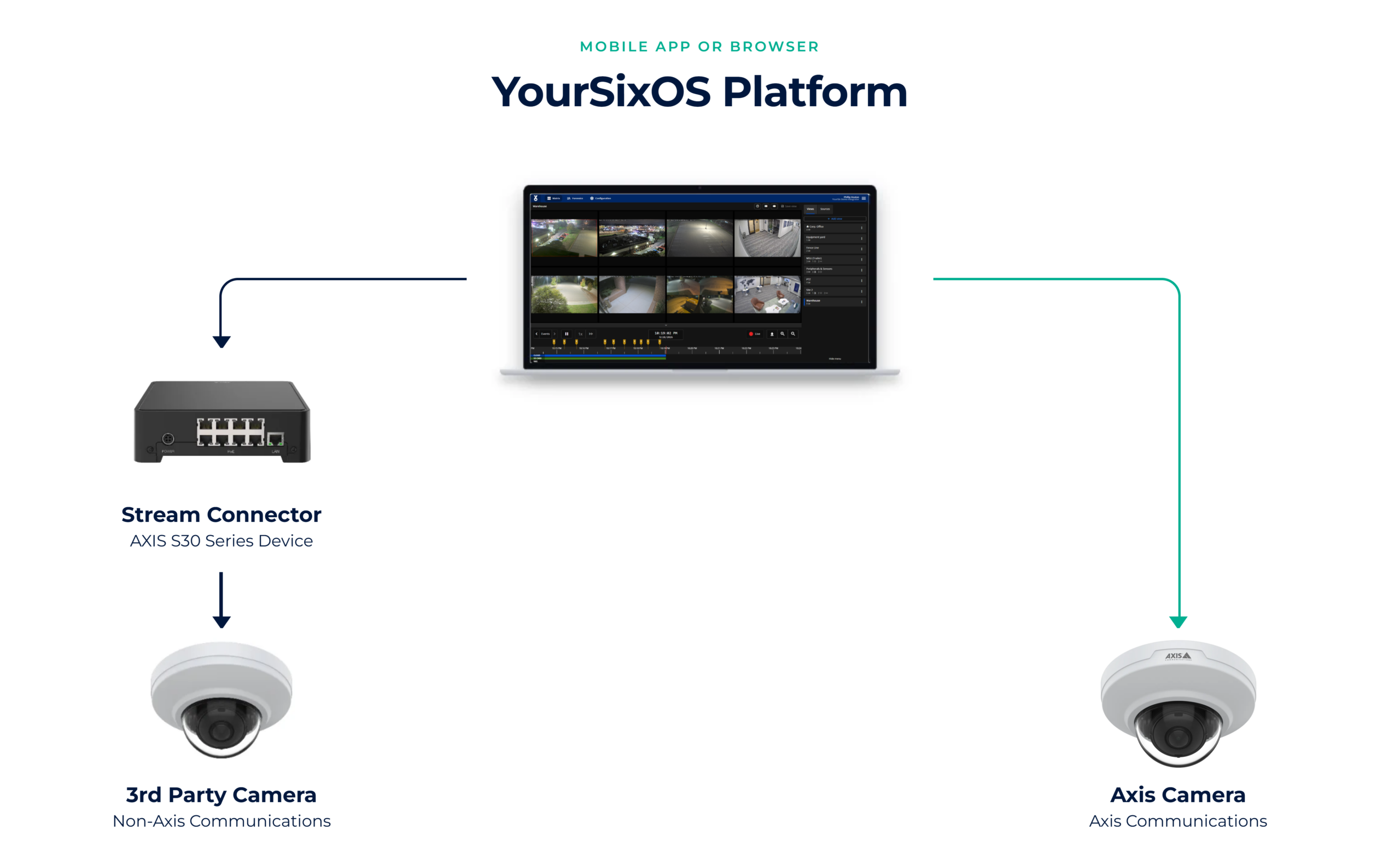
Devices can be connected to the YourSixOS cloud platform using one of two methods: direct-to-cloud connectivity with supported Axis devices, which communicate directly with the platform without the need for on-premises infrastructure, or through the Stream Connector, which enables supported third-party non-Axis devices to securely connect to the cloud using an Axis S30 Series appliance. This flexibility allows organizations to leverage both Axis and non-Axis devices within a single unified cloud-managed platform.
Details & Hardware Support
Stream Connector is designed to operate with existing infrastructure. Using AXIS S30 Series recorders, compatible third-party cameras can be connected via RTSP or ONVIF and integrated into the Y6OS environment. The AXIS S30 Series is available in 8-channel and 16-channel models.
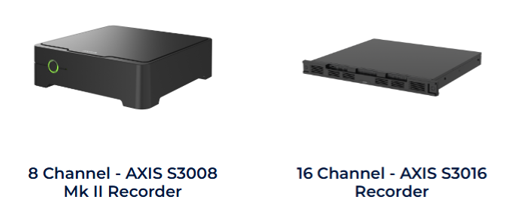
| Hardware Requirements | AXIS S3008 MK II (supports up to 8 channels) AXIS S3016 (supports up to 16 channels) |
| Firmware Requirement | AXIS S30 Series appliances must be running AXIS OS 11.11.212 firmware or higher |
| Storage Options | Local storage on the AXIS S30 appliance Available storage capacity depends on the model selected |
| ONVIF Support | ONVIF Profile S supported |
Stream Connector Capabilities & Limitations
The Stream Connector provides a simple way to bring existing third-party cameras into cloud video surveillance with YourSixOS, allowing organizations to modernize without immediately replacing their camera infrastructure. While it delivers access to live video and cloud recording, the experience differs from a native YourSixOS-supported Axis device.
What the Stream Connector Supports
-
- Live video viewing through the YourSixOS platform
- 24/7 continuous local video recording
- Cloud-based access to video from anywhere
- Centralized management alongside native YourSixOS devices
- Migration path for legacy camera environments
Important Limitations
-
- Video is limited to continuous recording only. Event-based recording is not supported.
- Event tags, smart search capabilities, and advanced video intelligence features available on native Axis devices are not supported.
- Camera health, firmware management, and other device-level capabilities available with native Axis integrations may not be available.
- Performance and video quality are dependent on the capabilities and configuration of the connected third-party camera.
How to Deploy Stream Connector
To deploy Stream Connector, complete the following steps. A detailed deployment guide is available in the Downloads section below.
-
- Configure the cameras through their local web interface so they can communicate with and be discovered by the Stream Connector (RTSP Recorder) ACAP.
- Download the Stream Connector (RTSP Recorder) ACAP and install it on the Axis S30 appliance.
- Use the ACAP interface to discover and connect the cameras.
- Enroll the S30 appliance into YourSixOS.
Once enrollment is complete, the connected camera streams will be available within the YourSixOS platform.
Stream Connector Downloads
Selecting the file below will automatically download a ZIP file to your local device. Please review the deployment guide for instructions on installing the ACAP and configuring devices to connect to YourSixOS.
-
- Stream Connector Guide: Download
- Stream Connector (RTSP Recorder) ACAP: ACAP Download
Stream Connector Subscriptions
The Stream Connector requires a subscription for the S30 appliance. Two subscription options are available:
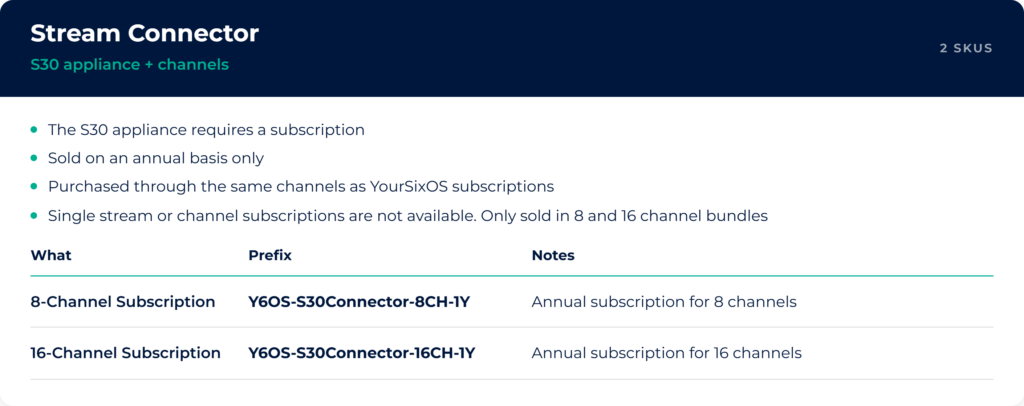
Subscriptions are sold on an annual basis only.
Both subscription options can be purchased through the same distribution and purchasing channels used today for YourSixOS subscriptions.
Learn More
-
- Solution: Stream Connector – YourSix
- Additional Insights: Stream Connector – Blog
- Platform Guides: Administration manual
- Training Videos: YourSix – YouTube