YourSixOS Mobile App
The YourSixOS mobile app gives users secure, remote access to their physical security environment from iOS and Android devices. View live and recorded video, export footage, receive push notifications, monitor device health, control PTZ cameras, manage connected I/O devices, perform audio talkdown, and access other YourSixOS capabilities directly from your mobile device.
Designed for security teams, administrators, and integrators who need access on the go, the YourSixOS mobile app extends cloud physical security management beyond the desktop and helps users monitor, investigate, and respond to events from virtually anywhere.
Features Supported by Mobile Applications
- Live streaming, exporting, and playback of footage
- Adding and configuring new devices
- Control both mechanical PTZ and digital PTZ remotely
- Health monitoring of sites and devices
- Manage and receive Notifications (including mobile push notifications)
- Control I/O devices and audio talk down
- Object Appearance Search
Application Updates
We recommend updating to the latest version of the YourSixOS mobile application as soon as it is released.
If an update is available, it should be installed within 2 weeks to ensure the application continues to function properly.
Feedback & Logs
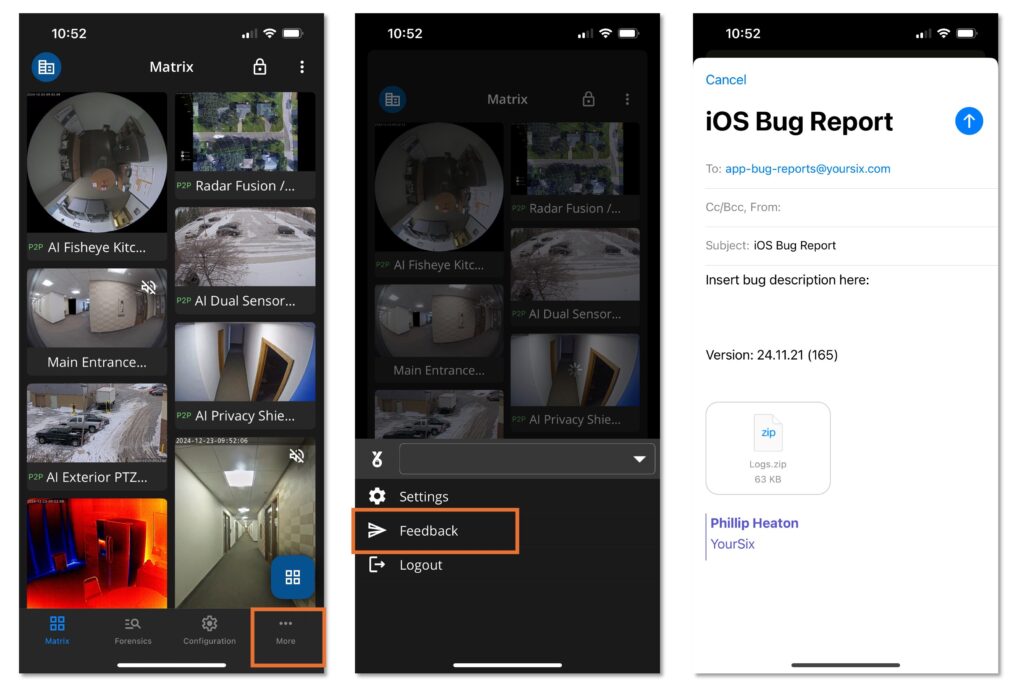
The Y6OS mobile application features a “Feedback” option that enables users to share their experience with the app and provide details for troubleshooting. When feedback is submitted, the email will include a zip file containing the application logs, which helps the YourSix Technical Support team quickly identify and address any issues or concerns. Please follow the steps below in order to provide feedback on your experience or when mobile application logs are needed for troubleshooting:
- Within the application, locate the “more” section along the bottom bar
- Within the “more” section, select “feedback”
- Add additional notes to the email and press send