

Organization Scopes
Scopes
YourSix understands that each organization is different and requires its employees to have unique access to organizational tools. Taking this into consideration, the Y6OS platform has three main Organizational scopes.
- Organizational Super Admin: For individuals who will manage the organization, including access to high-level organization, site, and user information
- Organization Admin: For individuals who need to manage the organization but have limited access to user and site information
- Organization User: For users who need basic functionality
Configuration Note: An email address can only be used once when creating a user.
| Topic | Details | Integrator Super Admin | Integrator Admin | Integrator Tech |
|---|---|---|---|---|
| Devices | Create, edit, delete controller | N | N | N |
| Access device interface | Y | Y** | N | |
| Reboot device | Y | Y* | N | |
| View controller | Y | Y | Y | |
| Barriers | Create, edit, delete barrier | N | N | N |
| View barrier | Y | Y** | N | |
| Barrier Groups | Create, edit, delete barrier groups | Y | N | N |
| View barrier groups | Y | N | N | |
| Identities | Create, edit, delete identities | Y | Y | N |
| View identities | Y | Y | N | |
| Identity Groups | Create, edit, delete identity groups | Y | Y | N |
| View identity groups | Y | Y | N | |
| Access Schedules | Create, edit, delete access schedules | Y | N | N |
| View access schedules | Y | N | N | |
| Access Rules | Create, edit, delete access rules | Y | N | N |
| View access rules | Y | N | N | |
| Live Controls | Control barrier on Matrix | Y | Y*** | N |
*Access device permission must be granted
**Denotes permissions only available with “Administer Scope” – given at a site level
***Requires granular permissions
Site & Device Permissions
Users of the Y6OS platform can also be granted permissions at the Site and device levels. This allows administrators to control access to specific sites or devices within a site. Users with Organizational Admin or Organizational User roles will only see sites or devices to which they have been given access.
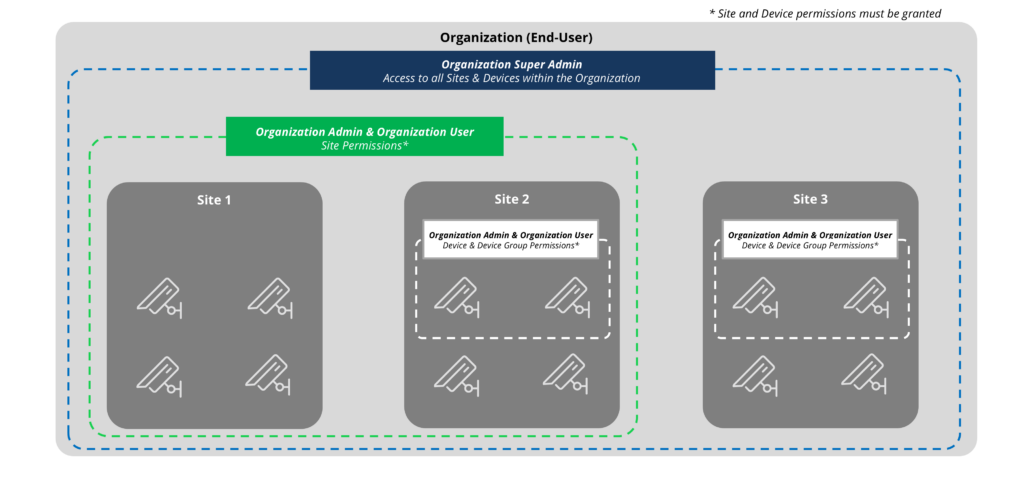
Site Permissions: The following site permissions can be granted to a user with the Organization Admin or Organization User scopes. If additional devices are added to the site, the site permissions will be applied to these new devices.
| Scopes | Details |
|---|---|
| Administer | Will allow users more control over device management and users. |
| Access Device | User will be able to access the device interface for all devices at site |
| Stream | User will be able to stream video for all devices at site |
| Playback Video | User will be able to playback video for all devices at site |
| Peripheral | User will be able to execute peripherals for all devices at site |
| Playback Audio | User will be able to playback audio for all devices at site |
| PTZ | User will be able to export video for all devices at site |
| Export | User will be able to export video for all devices at site |
| Talkdown | User can perform talkdown functions for all devices at site |
| Events | User will be able to search for events across all devices at site |
| Barrier Controls | User will be able to control the barrier state for all devices at site |
Device Permissions: The following device permissions can be granted to a user with the Organization Admin or Organization User scope.
| Scopes | Details |
|---|---|
| Administer | Will allow users more control over device management and users. |
| Access Device | User will be able to access the device interface |
| Stream | User will be able to stream video from device |
| Playback Video | User will be able to playback video from device |
| Peripheral | User will be able to execute peripherals for the device |
| Playback Audio | User will be able to playback audio from device |
| PTZ | User will be able to drive PTZ controls for the device |
| Export | User will be able to export video from device |
| Talkdown | User can perform talkdown function for device |
| Events | User will be able to search for events by device |
| Barrier Controls | User will be able to control the barrier state for the device |