

Integrator Users & Permissions
The YourSixOS Integrator Scope model defines how integrators can access and support customer environments within the platform.
Roles
An integrator user may have one of the following roles:
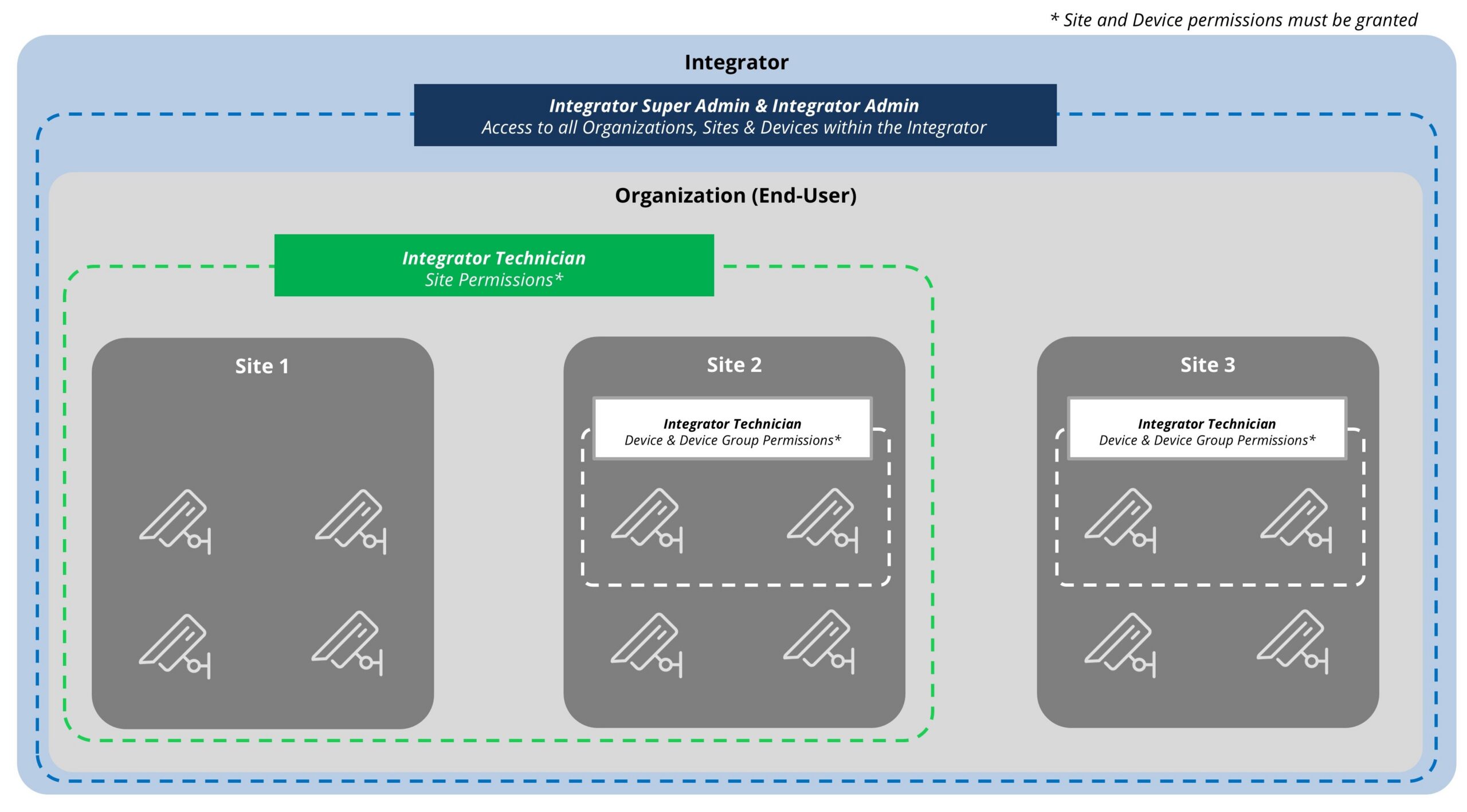
- Integrator Super Administrator: For individuals who require full administrative control, including managing users, customer access, permissions, and all resources across supported customer environments.
- Integrator Administrator: For individuals who need to manage users and provide support across customer environments but do not require unrestricted administrative access.
- Integrator Technician: For individuals responsible for deployment, configuration, troubleshooting, and support activities on customer resources that have been assigned to them through integrator scopes.
Configuration Note: An email address can only be used once when creating a user.
Granular Scopes & Permissions
Users of the Y6OS platform can also be granted permissions at the Site and device levels. This allows administrators to control access to specific sites or devices within a site. Users with the technician role will only see sites or devices to which they have been given access.
Learn More
-
- Manual/Guides: Integrator users
- Technical Reference: Authorization model
- Videos: Adding an Integrator User