Mobile Application
The Y6OS solution is accessible through our mobile application, which is available for both iOS and Android devices. You can find the app in their respective stores.
Features Supported by Mobile Applications
- Live streaming, exporting, and playback of footage
- Adding and configuring new devices
- Control both mechanical PTZ and digital PTZ remotely
- Health monitoring of sites and devices
- Manage and receive Notifications (including mobile push notifications)
- Control I/O devices and audio talk down
- Object Appearance Search
Application Updates
We recommend updating to the latest version of the YourSixOS mobile application as soon as it is released.
If an update is available, it should be installed within 2 weeks to ensure the application continues to function properly.
Feedback & Logs
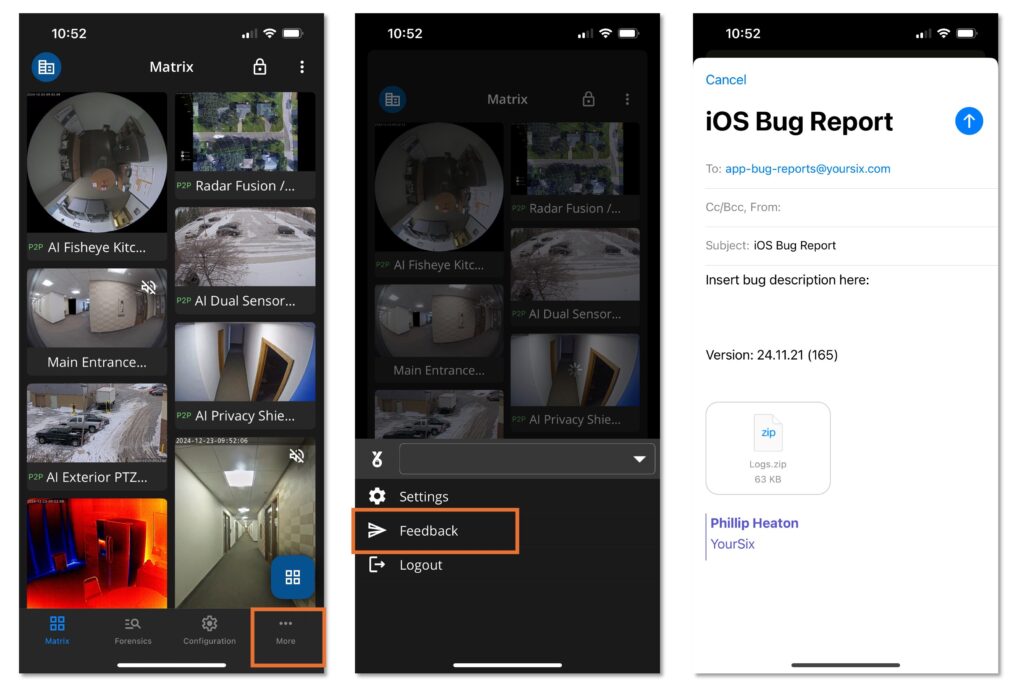
The Y6OS mobile application features a “Feedback” option that enables users to share their experience with the app and provide details for troubleshooting. When feedback is submitted, the email will include a zip file containing the application logs, which helps the YourSix Technical Support team quickly identify and address any issues or concerns. Please follow the steps below in order to provide feedback on your experience or when mobile application logs are needed for troubleshooting:
- Within the application, locate the “more” section along the bottom bar
- Within the “more” section, select “feedback”
- Add additional notes to the email and press send